Rational Service 110 error: scale in the SC pump, causes and reset
On a Rational iCombi Pro (S_110) or iCombi Classic (110), Service 110 means an SC automation error during cleaning: the SC pump should have pumped the steam generator empty while cleaning chemicals were inside, but the level electrode still reports it full. RATIONAL’s iCombi troubleshooting guide lists the level electrode, the steam generator drain line and SC pump housing, the combi water box, the plug connections, the SC pump and the steam generator reference volume as the parts to check. In LE Company’s experience the most common cause by far is limescale: tiny flakes break loose after descaling, get into the SC pump and block it, usually on the second or third day after the descaling was done. The oven cannot cook until the fault is repaired. For our full service, see Rational oven repair in London.
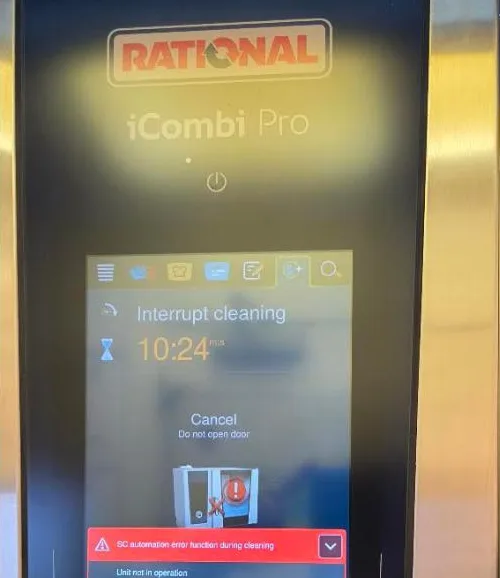
What does Service 110 mean on a Rational iCombi?
During automatic cleaning the steam generator holds water with cleaning chemicals. At the end of that step the SC pump pumps the steam generator out, and the level electrode should then see it empty. If the electrode still signals “full”, the oven stops the cleaning and shows Service 110. Without chemicals in the steam generator the same fault is reported as Service 10; Service 120 is the opposite case, when the steam generator is filled but never reads full. The display says the unit is not in operation, and the oven stays locked in an interrupted cleaning cycle until the cause is found. For the other codes and generations, see our Rational error codes guide.
What causes Service 110? Scale after descaling
Most Service 110 calls we attend come a few days after the steam generator was descaled. Descaling softens the scale and breaks it into flakes; most of them are flushed out, but a very small piece is enough to jam the SC pump. The pump then cannot empty the steam generator, and the next cleaning cycle ends in Service 110, typically on the second or third day after the descaling. That is why rinsing with clean water after descaling matters as much as the descaling itself.
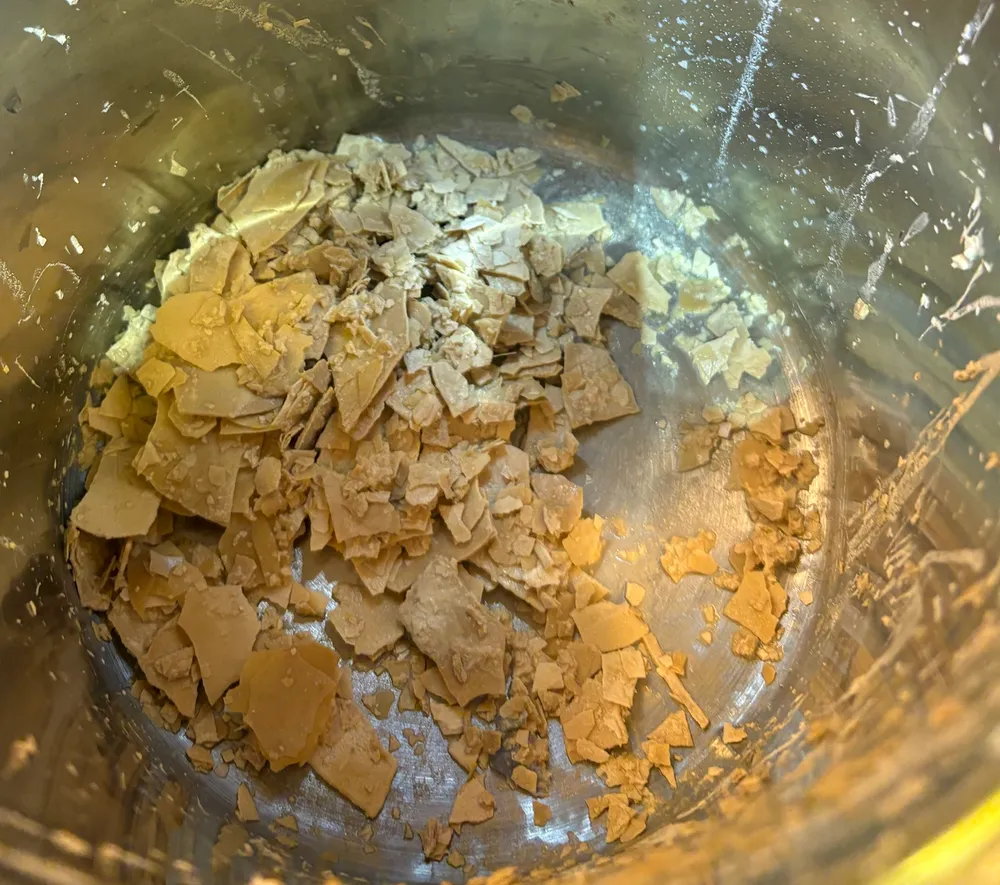
The other causes in RATIONAL’s guide are less common, but our engineers check them on the same visit:
- A soiled or faulty level electrode that keeps reading “full”. It is cleaned, or replaced if heavily soiled or misreading.
- A blocked drain line from the steam generator, or a clogged SC pump housing between the steam generator and the impeller.
- A blocked combi water box, cleaned by hand or replaced.
- A poor plug connection at the level electrode or between the pump and the control board.
- A wrong steam generator reference volume: the current filling volume must not be more than 20% below the reference, which can only be measured again on a descaled steam generator.
- Restricted water supply. On one London hotel iCombi Pro with Service 110 we replaced the pump housing, but the cleaning test still reported low water pressure. Swapping the water filter cartridges of the two stacked ovens proved that the top oven’s spent cartridge was restricting the flow.
How we fix Service 110 on a Rational
On an iCombi Pro we first run the “iCareSystem” module test and export all data to a USB stick, as RATIONAL asks before any part is disconnected. Then, with the oven isolated:
- Isolate the oven at the wall, not at its own switch. On a Rational oven one phase stays live when the oven is switched off; only two are disconnected. Anyone touching the back plate inside with the supply still connected can get an electric shock.
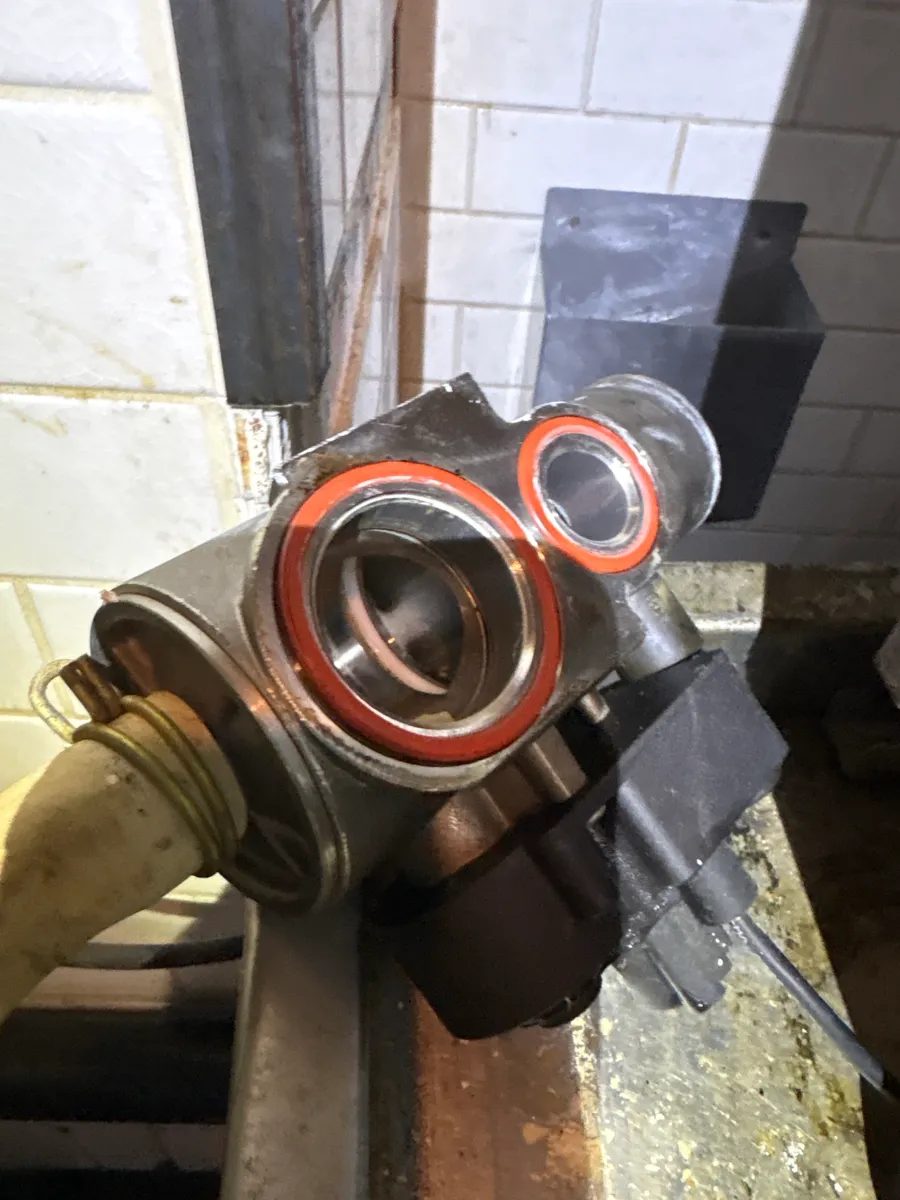
- Remove the SC pump and check it for scale. The pump and its housing are cleared of flakes, and the impeller is checked for free movement.
- Check inside the steam generator. The steam generator connection is removed by turning it clockwise, and the engineer feels inside the steam generator with the fingers for loose pieces of scale that would block the pump again.
- Check the quenching. The quenching sits directly behind the removed pump, so while there is access we check visually that it is not blocked with scale.
- Seals. Both rubber seals, on the quenching and on the steam generator connection, are lubricated with silicone, or better, replaced.
How to reset Service 110 on a Rational
Once the pump is clear and the oven is restarted, Service 110 goes by itself; there is no separate reset to perform. If it comes back at the next cleaning, the cause is still there, usually more scale in the steam generator or a level electrode that misreads. If a Service 42 error appeared at the same time, the “iCareSystem” module test is used to check the function and reset it.
How to prevent Service 110 after descaling
Rinse thoroughly with water after every descaling. The best way we have found is to disconnect the two hoses from the expansion tank and run water through from inside the oven, filling the tank through the opening where steam leaves the steam generator, so the loose flakes are washed out instead of being drawn into the pump. After a descaling it is also worth having the pump taken off and the steam generator checked for remaining flakes, as described above: an hour of work then saves an emergency call-out two days later. The same scale at the steam generator inlet can also send water out through the overflow: see Rational oven leaking water. For how scale builds up in the first place, see the Rational steam generator full of scale.
Service first
Every repair we do starts with checking and cleaning the oven. Scale in the steam generator, a spent water filter cartridge and seals nobody has looked at cause most cleaning faults, Service 110 among them. A regular Rational oven service descales, rinses and checks the pump, the quenching and the water treatment before they stop a cleaning cycle. See also Rational cleaning aborted or not cleaning properly, Rational Service 25, Rational Service 34 and Rational oven not steaming.
Book a Rational repair in London
LE Company’s call-out is from £175 + VAT and includes the first 30 minutes on site, when the engineer finds the cause of the fault. The cost of the repair is agreed with you before any work starts. 12-month guarantee on parts — we fit only original manufacturer parts. We repair Rational iCombi Pro, iCombi Classic, SelfCookingCenter and CombiMaster Plus in restaurants, hotels and pubs; see commercial oven repair and catering equipment repair, or call +44 203 603 7172, Monday to Saturday, 8am to 8pm.