Rational Oven Error Codes Explained
In any sophisticated appliance, and in Rational ovens specifically, error codes are one of the most helpful things to learn what issue this unit is encountering now. However, error codes vary significantly between manufacturers and even between different appliance models. So, to understand what’s happened to your exact appliance, you need to know the error codes of this exact manufacturer.
In this post, we explain the Rational oven error codes that flash in our customers’ kitchens most often, and then give the full list of service codes from RATIONAL’s own operating instructions, with real cases from our engineers.
iCombi Pro Error Codes
When it comes to the iCombi Pro (or the SelfCooking Center as its older version), the common issues are related to CleanJet® and humidity control. At LE Company, we classify the Service 25 and Service 30 as the most common error codes our customers encounter with their SelfCooking Centers.
Service 25
The Service 25 error code appears when the CleanJet® fails to function correctly. Typically, this error code flashes during the cycle and indicates there may be an issue with a water supply, filter or some blockage that you can fix yourself.
If you are facing Service 25 but can’t fix the issue yourself, you can continue using the appliance, but only for limited runs. Avoid heavy or prolonged use until the fault is rectified.
Service 30
The Service 30 error code appears when the humidity control or humidity measurement is not working correctly. If you are facing this error code, no DIY fixes are possible unless you are an engineer with expertise in Rational ovens. The cause here is a faulty humidity or temperature sensor, which may be defective or require calibration. Only a professional has both knowledge ad tools to handle the task.
Note, with Service 30 error code, it is possible to continue using the unit for cooking, but only to a limited extent.
Service 32
The Service 32 error code indicates unsuccessful ignition and appears when there is a problem with the gas system. Please note, if you see this error code, stop using the appliance, shut off the gas tap, and contact the Customer Service Center or professional Gas-Safe engineers immediately. Once the cause is fixed, the gas ignition box has to be reset; switching the oven off and on is not enough.
If you need emergency Rational oven repair in London, you can count on us – we are on the Gas Safe Register and can resolve any fault safely and efficiently. 
A simple guide on the Rational oven errors. Know when you can still use your oven or when you MUST stop using it.
VarioCooking Center Error Codes
When it comes to the VarioCooking Center, the common issues are related to core temperature probe, pan valve drive, or cover drive system. At LE Company, we classify the Service 100 (Service 101), Service 230 (Service 231) and Service 252 as the most common error codes our customers encounter with their VarioCooking Centers.
Service 100 (Service 101)
The Service 100 (or Service 101) error code appears when there is an issue with the core temperature probe. The Service 100 error code indicates there is an issue with the temperature probe for left-hand pan. The Service 101 error code indicates there is an issue with the temperature probe for right-hand pan.
With the Service 100 or Service 101 error codes, you can still use the right-hand pan or the left-hand pan of the appliance, respectively.
However, as using just one pan halves the unit’s output, we recommend arranging a repair without delay. The cause here is the faulty left / right pan core temperature probe. Here, there are no user-serviceable solutions – it is a job for an expert with proper knowledge and tools.
Service 230 (Service 231)
The Service 230 (or Service 231) error code appears when there is an issue with the pan valve drive. These error codes indicate, respectively, an issue with the left-hand or right-hand valve drive.
If you see Service 230 or Service 231 error code flashing, you can still use another pan without any limitation – the right-hand pan or the left-hand pan, respectively.
However, as running in single-pan mode negatively affects your kitchen capacity, we recommend fixing the issue as soon as possible. Typically, the cause here is the faulty left / right pan valve drive, which needs replacement. Such replacement is not a DIY task but a job for an expert.
Service 252
The error code Service 252 appears when there is an issue with the cover drive system. Typically, the problem affects both right-hand and left-hand pans. So, no further usage is possible until an engineer fixes the issue.
The nature of the Service 252 error code is highly complicated and always requires professional attention. Here is just some of the most likely causes we at LE Company have already dealt with:- Faulty potentiometer,
- Problem with the power supply to the control boards
- Loose connection between the control boards
- Problem with limit switches, etc.
RATIONAL service code list: SelfCookingCenter, CombiMaster Plus and iCombi Pro
The table below lists the service codes RATIONAL publishes in its operating instructions for the SelfCookingCenter, the CombiMaster Plus and the iCombi Pro. A SelfCookingCenter shows them as Service 25, a CombiMaster Plus as E25, and an iCombi Pro as Service 25 or with a sub-code after a point, such as Service 34.1. The numbers mean the same fault across the three ranges, although the iCombi Pro words some of them differently.
Code | Meaning (RATIONAL operating instructions) | Can you cook? |
10 | SC pump did not pump water away (iCombi: SC automation malfunctioning) | Yes |
11 | Water intake to the steam generator faulty | Yes |
12 | Water measurement (CDS) sensor gives no signal | Yes |
13 | Steam generator not refilled or water level not detected | Dry heat only |
14 | Level electrode does not recognise water (water conductivity too low) | Dry heat only |
17 | Unit data missing or unit model incorrect | iCombi: no |
20.x | Temperature sensor faulty (SelfCookingCenter: .1 cabinet, .2 quench, .4 humidity, .8 steam generator) | Limited |
23 / 24 | Solid-state relay short circuit (23 steam, 24 hot air) | No, switch off |
25 | No water flow during CleanJet cleaning | Yes, no cleaning |
26 / 27 | Drain (ball) valve cannot find its open (26) or closed (27) position | See below |
28.x | Temperature limit exceeded (iCombi 28.4: steam generator too cold) | No or hot air only |
29 | Circuit board too hot (above 85 °C) | iCombi: no |
30 | Humidity control / measurement faulty | Yes, limited |
31 | Core temperature probe faulty | Yes, without the probe |
32 / 33 | Gas: no flame after ignition / flame failure | No, close the gas tap |
34.x | Internal data communication (bus) error | Depends on sub-code |
35 | UltraVent hood not responding | Yes |
36 / 37 | Differential pressure sensor faulty or out of range | Yes, limited |
40 – 44 | CleanJet+care faults (care pump, steam nozzle, care valve, no heat-up during cleaning) | Yes |
50 / 51 | Clock not set (50) / clock battery faulty (51) | Yes |
52.x | Cabinet lighting fault | Yes |
60 | Gas ignition box start-up fault | Switch off and on |
72 | iCombi: the electronic safety temperature limiter (eSTL) has tripped | No |
110 | SC pump failed with care solution in the steam generator during cleaning | No |
120 | Water level not detected with care solution in the steam generator | No |
On a SelfCookingCenter, a message that still allows cooking can be dismissed with the Back key; on a CombiMaster Plus, with the clock (timer) key. An iCombi Pro lets you swipe the message aside, and it stays as a red symbol at the side of the screen until the fault is repaired. RATIONAL asks owners to have the serial number and software version ready when they report a fault.
iCombi Pro and iCombi Classic service codes
The iCombi Pro and iCombi Classic show codes as S_25 or Service 25, often with sub-codes such as 32.1.22 or 34.16. Several numbers mean something different from the SelfCookingCenter, so use this table for an iCombi. It is based on RATIONAL’s iCombi service documentation.
iCombi code | Meaning |
10 | SC-automatic fault: the steam generator was not pumped out, or the water level still reads full |
12 | Water quantity measurement error while the steam generator fills |
14 | Steam generator water level detection faulty |
20.x | Temperature sensor faulty: .1 cooking cabinet, .2 control box, .4 humidity, .8 steam generator, .16 bottom of the cooking cabinet, .32 installation area, .64 AutoDose (iCombi Pro) |
25 | Water circulation faulty during cleaning, the self-test or a module test |
27 | Drain valve does not reach its open or closed position |
28.1 / 28.2 | Temperature limit exceeded in the steam generator / in the cooking cabinet |
28.4 | Steam generator too cold (frost protection): hot air only until it warms up |
32.1.x | Ignition error: no flame after repeated ignition attempts |
32.2.x | Flame recognition error: a flame is detected while the gas valve is closed |
32.3.x | Combustion unstable: the flame went out several times |
32.4.x | Gas blower does not reach its target speed |
33.1 | Too many gas errors in a short time: the burner is blocked |
33.2 | Gas ignition controller start-up error |
33.3 | Mains frequency outside the permitted range |
33.4 | Polarity error: live and neutral are reversed at the electrical connection |
33.5 | Gas ignition controller defective |
34.1 / 34.2 / 34.4 | No communication with the top / middle / bottom fan motor (on 10-tray models 34.2 is the bottom fan) |
34.8 / 34.256 | No communication with the pump board / the chemical controller |
34.16 / 34.32 | No communication with the I/O board / the gas ignition controller |
42.1 to 42.6 | Water supply fault at a valve: steam generator filling, control box, moistening, care, cleaning |
45.1 to 45.6 | iCombi Pro: cleaning cartridge valve fault, chemicals not rinsed out properly |
46.1 / 47.1 / 48.1 / 49.1 | Pump fault: SC pump / waste-water pump / circulation pump / care pump |
53.1 | iCombi Pro: mixing pump fault |
54 | iCombi Pro: conductivity sensor fault |
59.1 to 59.4 | iCombi Pro: cartridge detection fault in slot 1 to 4 |
72 | The electronic safety temperature limiter (eSTL) has tripped |
110 | SC-automatic fault during cleaning, with cleaning chemicals in the steam generator |
120 | Steam generator water level detection faulty during cleaning |
140.4 / 140.8 | Repeated gas combustion errors: possible damage to the heat exchanger or burner |
What does RATIONAL Service 10 mean?
On a SelfCookingCenter or CombiMaster Plus, Service 10 (E10) means the SC pump did not pump the water away during SC-Automatic, usually because the pump or its hose is blocked or faulty. On an iCombi Pro it reads as SC automation malfunctioning. According to RATIONAL's operating instructions, you can still cook; the fault should be reported to a service engineer. A blocked SC pump is often a sign that the drain or the pump needs cleaning as part of regular commercial oven maintenance.
RATIONAL Service 12, 13 and 14: water measurement and steam generator
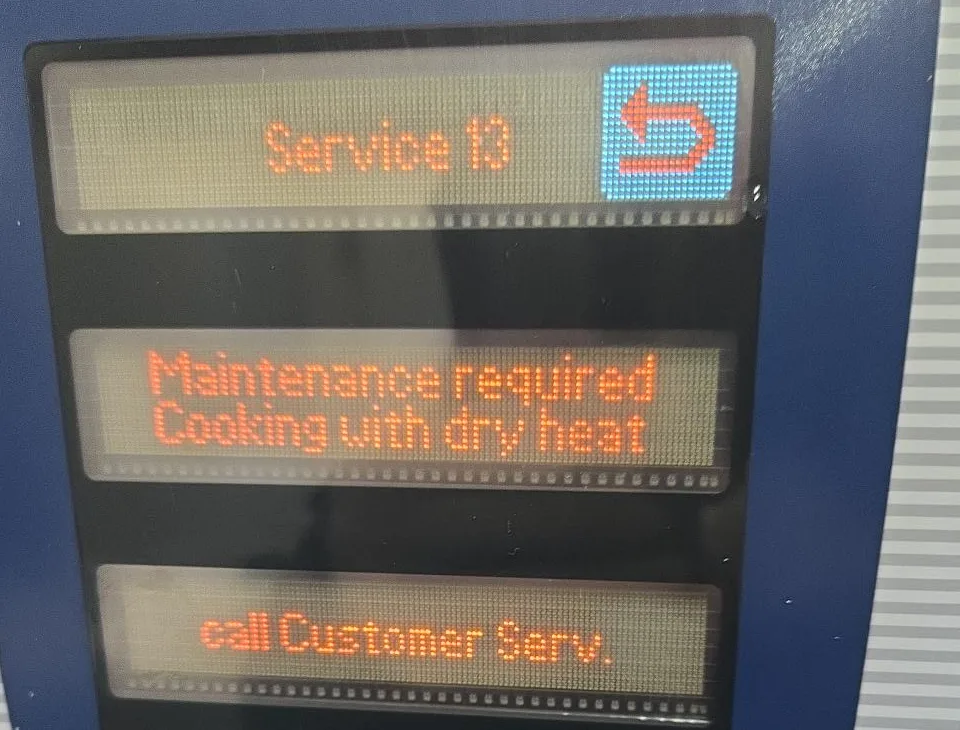
Service 12 means the water measurement sensor gives no signal; cooking can continue. Service 13 means the steam generator was not refilled or its water level was not detected, and Service 14 means the level electrode cannot recognise water, for example because the water is too soft after reverse osmosis. With 13 and 14 the oven cooks with dry heat only.
In November 2026 our engineers saw Service 13 on a SelfCookingCenter 201 E in a London kitchen. The level electrode was clean. After the control unit was reprogrammed, Service 13 cleared and did not return. The same visit found the real problem the chef had noticed: the lower fan motor did not reach its rated output on the control unit’s motor test, which made the bottom of the oven cook more slowly. The motor fault had never raised a code, because the control unit does not detect that the motor is under-performing.
RATIONAL Service 20 and 31: temperature sensors and core probe
Service 20 means a temperature sensor is faulty, and the number after the point says which one. On a SelfCookingCenter: .1 the cabinet sensor, .2 the quench sensor, .4 the humidity sensor and .8 the steam generator sensor, added together when more than one fails. On an iCombi Pro or iCombi Classic: .1 the cooking cabinet, .2 the control box, .4 humidity, .8 the steam generator, .16 the bottom of the cooking cabinet, .32 the installation area and, on the iCombi Pro, .64 the AutoDose sensor. On an iCombi Pro, 20.1 stops cooking, while 20.2 and 20.4 still allow it. Service 31 is the core temperature probe; you can keep cooking without the probe.
What does RATIONAL Service 34 or 34.1 mean?
Service 34 is an internal data communication (bus) error. On a SelfCookingCenter the number after the point says which part has stopped answering: 34.1 the top fan motor, 34.2 the bottom fan motor, 34.4 the top ignition module and 34.8 the bottom ignition module, and the numbers add up (34.10 = 34.2 + 34.8). On an iCombi Pro or iCombi Classic the sub-codes are different: 34.1 the top fan motor, 34.2 the middle fan motor (the bottom one on 10-tray models), 34.4 the bottom fan motor, 34.8 the pump board, 34.16 the I/O board and 34.32 the gas ignition controller; 34.1, 34.2 and 34.4 stop cooking. On a SelfCookingCenter, follow the prompts on the screen; if the code stays, an engineer needs to check the fan motor, the ignition module or the wiring to them.
RATIONAL Service 26, 27 and 40 to 44: cleaning faults
Service 26 and 27 mean the drain (ball) valve cannot find its open or closed position. For Service 26 on a SelfCookingCenter, run Interrupt CleanJet and rinse out the tabs before calling; for Service 27, switch the oven off at the mains for five seconds and back on. Service 40 to 44 are CleanJet+care faults: 40 the care pump is not delivering (on an iCombi Pro, the care liquid is too low), 41 the steam injection nozzle, often scaled, 42 the care valve, and 44 no heat-up during cleaning. Restart the clean once; if the code repeats, call an engineer. On an iCombi Pro or iCombi Classic, water supply faults appear as 42.1 to 42.6 (the filling, control box, moistening, care and cleaning valves), pump faults as 46.1 (SC pump), 47.1 (waste-water pump), 48.1 (circulation pump) and 49.1 (care pump), and a drain valve that cannot reach its position as Service 27.
RATIONAL Service 32 and 33: gas faults
Service 32 means no flame was detected after ignition and Service 33 a flame failure. Stop cooking, close the gas tap and call a Gas Safe registered engineer. On iCombi Pro and SelfCookingCenter gas models, RATIONAL notes that the ignition box has to be reset once the cause is fixed; switching the oven off and on is not enough. On an iCombi the gas codes carry sub-codes: 32.1.x no flame after repeated ignition attempts, 32.2.x a flame detected while the gas valve is closed, 32.3.x unstable combustion and 32.4.x a gas blower that does not reach its speed. Resetting a gas fault again and again does not help: after too many gas errors in a short time the iCombi shows Service 33.1 and blocks the burner, and repeated errors can lead to Service 140.4 or 140.8, which point to possible damage to the heat exchanger or burner. Service 33.3 (mains frequency) and 33.4 (live and neutral reversed) point to the electrical supply, not the oven. LE Company engineers are Gas Safe registered.
RATIONAL Service 50, 51 and 72
Service 50 means the oven clock is not set; set the date and time. Service 51 means the clock battery is faulty and needs replacing. On an iCombi Pro or iCombi Classic, Service 72 means the electronic safety temperature limiter (eSTL) has tripped. The engineer reads its blink code to find out why, and the oven must not be used for cooking until it is checked.
What does RATIONAL Service 110 mean?
Service 110 means the SC pump failed while care solution was in the steam generator during automatic cleaning. RATIONAL’s instructions say the oven cannot be used for cooking until the service partner has repaired it. Service 120 is a related fault: the water level was not detected while care solution was in the steam generator.
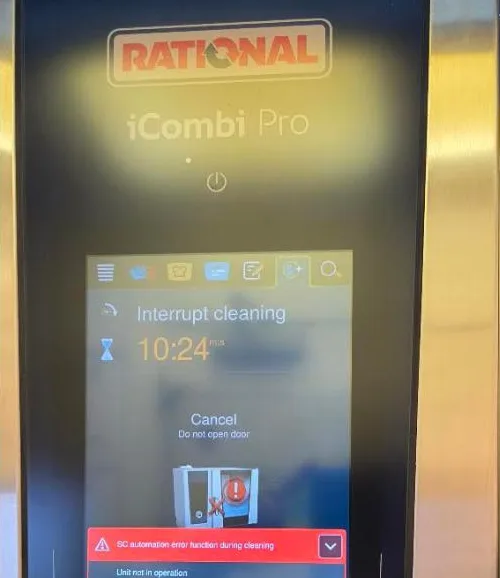
In October 2026 we were called out in an emergency to a hotel kitchen in London where the top iCombi Pro of a stacked pair had stopped in an interrupted cleaning cycle with Service 110. We replaced the pump housing and found no scale inside the oven, but during the cleaning test the display kept reporting low water pressure. Swapping the water filter cartridges between the two ovens proved it: the top oven’s cartridge was restricting the flow. On the return visit we fitted a new cartridge and descaled the whole water system. A descaling request on the control could only be reset after a long cleaning cycle had been run. Cartridge changes and descaling are now part of that kitchen’s catering equipment maintenance plan.
Can I keep cooking when my RATIONAL shows a Service code?
It depends on the code. RATIONAL's operating instructions say that for many codes, such as Service 10, 11, 12, 25, 30, 31 and 36, cooking can continue, sometimes with dry heat only. For gas faults (Service 32 and 33) you must close the gas tap and stop cooking, and for Service 23, 24, 72, 110 and 120 the oven should not be used until an engineer has repaired it.
Conclusion
For some errors, you can clear the code with the arrow button and continue using the unit, though there are still some limitations on its usage. However, for some other codes (especially for the codes that indicate gas issues), stop using the appliance until an expert fixes the issue.
If your oven shows a code that is not listed here, take a photo of the display and contact us. LE Company’s call-out is from £175 + VAT and includes the first 30 minutes on site, when the engineer finds the cause; the cost of the repair is agreed before any work starts. See our Rational oven repair page, read whether it is worth repairing a Rational oven, or see our frequently asked questions. 
Our simple guide about the Rational oven issues. It helps you to either fix it yourself or call an engineer.